


Help System Search
Search will return help pages with one or more of the search terms. Search ignores the following words: "a", "an", "the", "with", "of", "for", "to", and "and".
Applying a Filter
1. To apply any of the search filters, click on the checkbox next to the name of the filter you want to apply. For example, to filter by the Mid-Pacific region, click on the checkbox next to “Mid-Pacific” in the Region Type filter box:
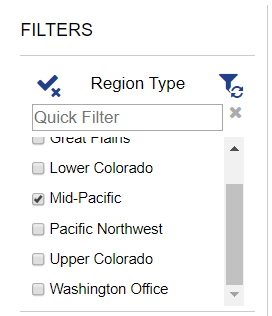
2. Apply the filter by clicking on the refresh filter icon. Note: When you select a filter option, the check mark and filter icons will change to indicate actions that you can now take. The “X” by the check mark indicates that you can click it to de-select all the filters you have selected. The refresh symbol by the filter icon indicates that the filters you have selected can now be applied.
